November 11, 2013

XNA Hack: Create RenderTarget2D greater than 4096x4096

Problem:

XNA's HiDef profile has a maximum Texture2D size of 4096x4096.  RenderTarget2D has a backing Texture2D object, and this limitation is enforced at time of construction.

Solution:

Time to get a bit tricky with reflection.  Limitations in XNA are all stored in Microsoft.Xna.Framework.Graphics.ProfileCapabilities, an internal class.  Fortunately, they aren't constants...

In your Initialize() function...

Assembly xna = Assembly.GetAssembly(typeof(GraphicsProfile));
Type profileCapabilities = xna.GetType("Microsoft.Xna.Framework.Graphics.ProfileCapabilities", true);
if (profileCapabilities != null)
{
     FieldInfo maxTextureSize = profileCapabilities.GetField("MaxTextureSize", BindingFlags.Instance | BindingFlags.NonPublic);
     FieldInfo hidefProfile = profileCapabilities.GetField("HiDef", BindingFlags.Static | BindingFlags.NonPublic);
     if (maxTextureSize != null && hidefProfile != null)
     {
         object profile = hidefProfile.GetValue(null);
         maxTextureSize.SetValue(hidefProfile.GetValue(null), MaxTextureSize);
     }
}

Replace MaxTextureSize in the last line with whatever you feel your maximum size should be. Ideally, you'll be querying DirectX 9 and setting the value to the maximum value allowed by D3D9Caps.

November 9, 2013

Mono.Cecil Lessons Learned

Well, working on RomTerraria 3 has been fun.  I got to learn more about MSIL than I ever wanted to, and got to work with a great tool.

A few lessons I learned working with Mono.Cecil that might help others.

EmbeddedResources.  If you use the System.IO.Stream overload for an EmbeddedResource, it won't try to open the stream until you save out the assembly, so keep scope and closing of your streams in mind.

Always Import Your Methods.  If you are calling another method in your calls, ALWAYS import.  If the method already exists, no harm.  If it doesn't exist, you'll save yourself some hassle.

var nextInstruction = processor.Create(Mono.Cecil.Cil.OpCodes.Call, method.Module.Import(hookMethod));
processor.InsertAfter(newInstruction, nextInstruction);

Replacing default values.  I had to replace three types of default values in methods: strings, bools, and ints.  I ended up creating three different helpers for these.

        public static void ReplaceStringInMethod(MethodDefinition method, string oldString, string newString)
        {
            for (int i = 0; i < method.Body.Instructions.Count; i++)
            {
                if (method.Body.Instructions[i].OpCode == Mono.Cecil.Cil.OpCodes.Ldstr &&
                    method.Body.Instructions[i].Operand.ToString() == oldString)
                {
                    method.Body.Instructions[i].Operand = newString;
                }
            }
        }

        public static void ChangeDefaultBooleanValue(MethodDefinition method, string fieldName, bool newValue)
        {
            var il = method.Body.GetILProcessor();
            foreach (var instruction in il.Body.Instructions)
            {
                if (instruction.OpCode == Mono.Cecil.Cil.OpCodes.Stsfld)
                {
                    var field = (FieldDefinition)instruction.Operand;
                    if (field.FullName == fieldName)
                    {
                        var previnst = instruction.Previous;
                        if (previnst.OpCode == Mono.Cecil.Cil.OpCodes.Ldc_I4_1 ||
                            previnst.OpCode == Mono.Cecil.Cil.OpCodes.Ldc_I4_0)
                        {
                            previnst.OpCode = newValue ? Mono.Cecil.Cil.OpCodes.Ldc_I4_1 : Mono.Cecil.Cil.OpCodes.Ldc_I4_0;
                            return;
                        }
                    }
                }
            }
            throw new KeyNotFoundException(String.Format("Default value not found for '{0}'.", newValue));
        }

        public static void ChangeDefaultInt32Value(MethodDefinition method, string fieldName, int newValue)
        {
            var il = method.Body.GetILProcessor();
            foreach (var instruction in il.Body.Instructions)
            {
                if (instruction.OpCode == Mono.Cecil.Cil.OpCodes.Stsfld)
                {
                    var field = (FieldDefinition)instruction.Operand;
                    if (field.FullName == fieldName)
                    {
                        var previnst = instruction.Previous;
                        if (previnst.OpCode == Mono.Cecil.Cil.OpCodes.Ldc_I4)
                        {
                            previnst.Operand = newValue;
                            return;
                        }
                    }
                }
            }
            throw new KeyNotFoundException(String.Format("Default value not found for '{0}'.", newValue));
        }

There's still a lot of stuff I need to learn about Mono.Cecil.  I'm working on making my code injection routines generic and I'm cleaning up a lot of code before I release the code to RomTerraria, but this is an extremely powerful tool for greybox code modification and should be in every .NET developer's toolbox.

November 7, 2013

RomTerraria 3 Preview Release Here

[Update 6/30/2015 7:09pm] Updated v4 version here for use with Steam and GOG 1.3.x and above.

I've released RomTerraria 3 as a preview release.  This release should ONLY be used by people who want to play at resolutions greater than 2048 in either direction (up to 8192).

Features in this release:

- RomTerraria generates a new executable in your <My Documents>/My Games/Terraria named Terraria.Rewritten.exe.  This executable is custom created based on the settings you select.
- RomTerraria's settings file is saved to <My Documents>/My Games/Terraria/config.rt so it won't impact your settings from stock Terraria.
- Force XNA into HiDef profile instead of Reach so that it will take advantage of Shader Model 3.0 spritebatches.
- Eliminates the depth buffer on render targets, reducing video card memory usage by half.
- Enhanced lighting (and its accompanying performance increases) will work at resolutions over 1920x1080 (up to 8192x8192). I found a workaround for XNA's RenderTarget2D size limitations.


Possible issues:

- If your system doesn't meet the HiDef profile, you'll fail miserably.
- May not work on the Collector's Edition.

[Update 1/19/2015 9:10p] Starting to add back in single player functions, like "Always Daylight" and "Spawn NPCs Fast."
v0.99.1 (deprecated) download here.

Unzip this to someplace OTHER than your Terraria install folder. 

Screenshots


Note: If you encounter any crashes, hit Ctrl-C in the dialog that pops up with the stack trace, and paste the stack trace into a reply to this post.

Note #2: I can't accept donations or any sort of financial compensation for RomTerraria. If you want to show some support for RomTerraria, please donate to support survivors of Typhoon Haiyan.

Note #3: If you are getting an error that says "Unable to find Terraria," make sure Steam is running.  If it still can't find Terraria, uninstall and reinstall the game.  I rely on metadata that Steam provides to find Terraria in alternate install locations.  If it still can't find the game, add me as a friend on Steam and I'll see what I can find.

[Update 11/12 7:35p] v0.96 released.  No bug fixes, but pops up a prompt if you drop RomTerraria 3 in the same folder as Terraria to prevent an error.

[Update 11/13 10:56a] Added donation link for survivors of Typhoon Haiyan, cleaned up the page.

[Update 11/29 4:15p] v0.97 released.  Additional code for people who are having problems patching.

[Update 12/19 10:27p] This works with no modification on the new v1.2.2 release.  If you had previously patched v1.2.1, just rerun the patcher and it will update Terraria.Rewritten.exe for you.

[Update 2/19/2014 10:12p] This works with no modification on the new v1.2.3.1 release.  If you had previously patched v1.2.1, just rerun the patcher and it will update Terraria.Rewritten.exe for you.

[Update 1/18/2015 11:45a] This version now works with the GOG.com version and puts no files in the Terraria folder.

[Update 1/19/2015 9:10p] This version is starting to add in single player hooks.

[Update 2/3/2015] Cleaning up some ancient comments so relevant topics bubble up.

November 4, 2013

Another RomTerraria Delay

Sorry, guys.  I've got one last exception throwing that I have to solve before I can release this.

No ETA, since the exception that's being thrown is telling me that something is going wrong the frame before.

[Update 11/5] Okay, I figured it out.  There are some corner cases where Terraria will dispose of its render targets, not recreate them, but still have renderToScreen set to false, which leads to XNA calls telling Terraria to render to a disposed render target.

I'll spend tonight analyzing the code base and hopefully I'll be able to figure out not only which MSIL instructions to inject, but where...

[Update #2 11/5] Easier to do this fix in C# and then inject the method call...

[Update #3 11/5] New executable sent out to my testers. Final list of changes I needed to do include:

- Hook into Terraria.Main.Window.ClientSizeChanged and reset the graphics device and default render target.
- Completely replace Terraria.Main.InitTargets() and Terraria.Main.ReleaseTargets().
- Clear the "loaded" flag on all of the content loaded outside of Terraria.Main.LoadContent() to prevent ObjectDisposedExceptions.

[Update #4 11/6] A version of RomTerraria with only XNA Hi-Def and large resolution support will be released as a preview as soon as I hear back from all my testers. Please be aware that because of how MSIL injection works, RomTerraria will ONLY work with the Steam version of Terraria at the moment.  Once I get my hands on a retail copy, I'll look into extending it to work properly with the retail version.

[Update #5 11/6] Working on a weird issue where the XNA profile is resetting back to Reach, but almost there.  Tossing in one extra feature to make up for the delay.  Guess what it is?  Hint: what was exclusive to the retail release?

November 3, 2013

RomTerraria 3.0 Feature #1: Large Resolution Fixes


The most common complaint about RomTerraria lately has been that since Terraria 1.2 was released, Eyefinity/nVidia Surround support breaks down when either horizontal or vertical resolution goes above 2048 pixels when using default lighting.

The reason? They moved to a render-to-texture system and fixed the maximum render-to-texture size at 2048x2048.

Well, with RomTerraria 3.0, you'll have access to resolutions up to 8192x8192 4096x4096.

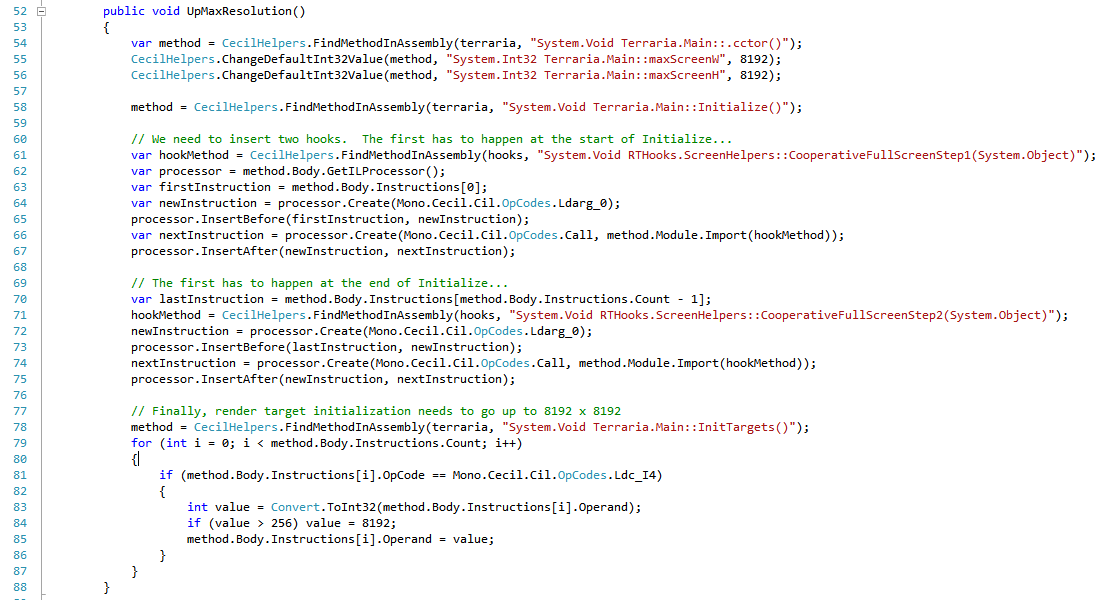
Here's how it will work.  The code is split into three chunks.  Two chunks will ship as an accompanying .NET assembly, RTHooks.dll.  The third chunk is actually rewritten into the Terraria executable.

Lines 54-56 change the maximum resolution from 1920x1080 to 8192x8192 4096x4096.

Lines 60-75 wire up calls to RTHooks inside Terraria.Main.Initialize(), similar to what I did with a subclass back with RomTerraria 1 and 2, but without requiring a subclass.  These two hooks set the game to run at the current desktop resolution and enable cooperative full screen rendering.

Lines 78-87 walk through Terraria.Main.InitTargets() and finds the constants there.  There are only a couple of constants, and they all are tied to calculating the size of the render targets.  This boosts them up to 8192x8192 4096x4096.

Currently looking at a November 5 7 release.  Just needs more testing.

[Update 11/6] Screenshots!  Thanks, Steve!


[Update #2 11/6] Sorry, but due to an XNA 4.0 limitation on the maximum size of a render target, you will be limited to 4096x4096.